MATRIX Mini R4 Blocks API
This document provides a complete API reference for MATRIX Mini R4 robot Blockly visual programming blocks.
MATRIX Mini Basics
Initialization Setup
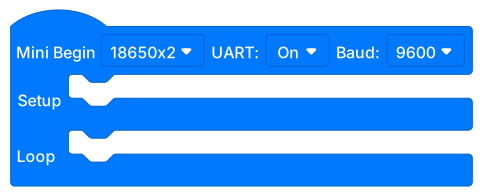
Function Description: Initialize basic settings for the MATRIX Mini development board. This block should be placed at the beginning of the program. This is a HAT block. All main code except events and custom functions should be placed here, the concept is the same as Arduino's Setup and Loop.
Note: Do not place multiple instances of this block in the program canvas, as this will cause abnormal functionality.
Usage:
This block automatically initializes onboard hardware, please configure battery, Serial and other information as needed.
All core program business logic is executed here, Setup runs only once, while Loop repeats continuously.
Button Read

Function Description: Read the state of the onboard button.
Return Value:
true: Button is pressedfalse: Button is not pressed
Power Voltage Read
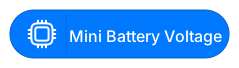
Function Description: Read the power input voltage value (unit: volts).
Return Value:
Floating point number representing current power voltage
Digital Input Read

Function Description: Read the input state of the specified digital pin.
Parameters:
Pin: Select the digital pin to read, the four pins of digital pins are Left, Right, VCC, GND
Return Value:
HIGH(1): High levelLOW(0): Low level
Digital Output Set

Function Description: Set the output state of the specified digital pin.
Parameters:
Pin: Select the digital pin to set, the four pins of digital pins are Left, Right, VCC, GND
State: HIGH or LOW
Analog Input Read

Function Description: Read the value of the specified analog pin.
Parameters:
Pin: Select the analog pin to read, the four pins of analog pins are Left, Right, VCC, GND
Return Value:
Integer value (0-1023)
DC Motor Direction Set
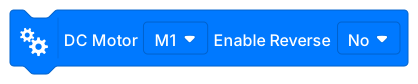
Function Description: Set the rotation direction of the DC motor.
Parameters:
Motor: Select the pin where the motor is connected (M1~M4)
Direction: Forward or Reverse
Motor PPR and RPM Settings

Function Description: Set the encoder motor's pulses per revolution (PPR) and rated speed (RPM) parameters.
Parameters:
Motor Pin: Pin where the motor is connected (M1~M4)
PPR: Pulses per revolution (default: 545)
RPM: Rated speed (default: 200)
Description:
PPR value depends on the encoder motor specifications used, common motor reference values:
MATRIX TT Encoder Motor: 545
LEGO Mid Motor: 360
Ranger 180 Motor: 695
RPM value is used for speed control calculation, common motor reference values:
MATRIX TT Encoder Motor: 200
LEGO Mid Motor: 260
Ranger 180 Motor: 240
Motor Power Control

Function Description: Set motor power (PWM) and start operation.
Parameters:
Motor: Select the pin where the motor is connected (M1~M4)
Speed: -100% to 100% (negative for reverse)
Motor Speed Control

Function Description: Set motor speed and start operation, but calculates speed in real-time through Encoder and uses PID for stable speed control.
Parameters:
Motor: Select the pin where the motor is connected (M1~M4)
Speed: -100% to 100% (negative for reverse)
Motor Brake
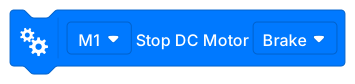
Function Description: Stop the motor and apply brake.
Parameters:
Motor: Select the pin where the motor is connected (M1~M4)
Brake method: Brake accelerates stopping through motor H-bridge driver chip, Coast releases throttle for coasting, Hold uses PID brake to ensure angle stability (not yet released)
Encoder Reset
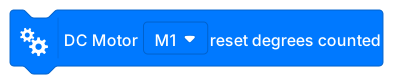
Function Description: Reset encoder count value to zero.
Parameters:
Motor: Select the pin where the motor is connected (M1~M4)
Encoder Read

Function Description: Read the current count value of the encoder.
Parameters:
Motor: Select the pin where the motor is connected (M1~M4)
Return Value:
The angle (degrees) the motor has rotated
RC Servo Motor Direction Set

Function Description: Set the rotation direction of the RC servo motor.
Parameters:
Servo Motor: Select the pin where RC Servo is connected
Direction: Forward or Reverse
RC Servo Motor Angle Set
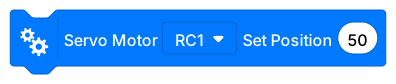
Function Description: Set the angle position of the RC servo motor.
Non-blocking function, the program will immediately continue execution, add delay manually if necessary
Parameters:
Servo Motor: Select the pin where RC Servo is connected
Angle: 0-180 degrees (to control servos with angles above 180, remap 0-270 to 0-180)
Movement Control
This category provides high-level control blocks for robot movement, including synchronized control, gyroscope assistance and other functions.
Chassis Configuration Settings

Function Description:
If using non-MATRIX motors, please configure PPR, RPM, direction and other information through motor blocks before use.
Configure left and right motors and their reverse settings for differential drive robots.
Parameters:
Left Motor Pin: Select the pin where the motor is connected (M1~M4)
Left Motor Reverse: Whether to reverse left motor direction
Right Motor Pin: Select the pin where the motor is connected (M1~M4)
Right Motor Reverse: Whether to reverse right motor direction
PID Control Parameter Settings

Function Description: Set PID controller parameters for movement synchronization or gyroscope control.
Parameters:
PID Type: MoveSync (motor synchronization control), MoveGyro (gyroscope movement), TurnGyro (gyroscope turning)
Kp: Proportional gain
Ki: Integral gain
Kd: Derivative gain
Adjustment Suggestions:
Increasing Kp can improve response speed, but too much will cause oscillation
Ki is used to eliminate steady-state error
Kd can reduce overshoot and improve stability
Default PID Values (Kp, Ki, Kd) Reference:
MoveSync:
LEGO-MID(0.002, 0.00, 0.004)
MATRIX-TT(0.02, 0.00, 0.04)
MoveGyro:
LEGO-MID(0.52, 0.00, 0.15)
MATRIX-TT(6.01, 0.00, 2.15)
TurnGyro:
LEGO-MID(22.75, 0.02, 1.54)
MATRIX-TT(22.75, 0.08, 0.25)
Move for Specified Distance/Angle

Function Description: Control the robot to move a specified distance or angle.
Parameters:
Unit: Seconds, degrees or rotations
Value: Movement amount
Left Wheel Speed: -100 to 100
Right Wheel Speed: -100 to 100
Synchronized Move for Specified Distance/Angle

Function Description: Use PID synchronization control to keep left and right wheels moving consistently.
Parameters:
Unit: Seconds, degrees or rotations
Value: Movement amount
Left Wheel Speed: -100 to 100
Right Wheel Speed: -100 to 100
Features:
Uses PID control to ensure left and right wheel synchronization
Suitable for situations requiring straight-line movement
Gyroscope-Assisted Movement

Function Description: Use gyroscope sensor assistance to maintain straight-line movement.
Parameters:
Unit: Seconds, degrees or rotations
Value: Movement amount
Speed: 0 to 100
Features:
Uses gyroscope to correct directional deviation
Suitable for long-distance straight-line movement
Continuous Movement
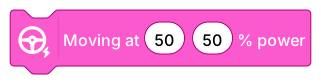
Function Description: Start continuous movement until stop command. *Power is PWM output, no PID speed control, suitable for use with user's own line-following or other algorithms (such as PID)
Parameters:
Left Wheel Speed: -100 to 100
Right Wheel Speed: -100 to 100
Continuous Synchronized Movement
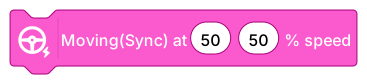
Function Description: Continuous movement with PID synchronization control.
Parameters:
Left Wheel Speed: -100 to 100
Right Wheel Speed: -100 to 100
Continuous Gyroscope Straight Movement

Function Description: Continuous straight movement with gyroscope assistance.
Parameters:
Speed: 0 to 100
Gyroscope Turn (Single Wheel)

Function Description: Control the robot to turn to a specified angle, can set turning speed. Uses gyroscope Yaw Heading for turning angle detection.
Parameters:
Angle: Turning heading angle (degrees), positive for clockwise, negative for counterclockwise
Speed: 0 to 100
Features:
Uses gyroscope to ensure precise turning
Gyroscope Turn (Two Wheel)

Function Description: Control the robot to turn to a specified angle, can set turning speed. Uses gyroscope Yaw Heading for turning angle detection.
Parameters:
Angle: Turning heading angle (degrees), positive for clockwise, negative for counterclockwise
Speed: 0 to 100
Chassis Movement Accumulated Angle

Function Description:
Read the accumulated rotation angle value of the motor since last reset, can be used to calculate travel distance.
Its calculation method is (abs(leftMotorDegs) + abs(rightMotorDegs)) / 2.
Note: Does not conflict with original motor Encoder angle calculation.
Return Value:
Motor accumulated rotation angle (degrees)
Reset Chassis Accumulated Angle
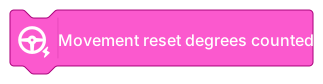
Function Description: Reset the chassis accumulated angle to zero, used to restart distance calculation. It is recommended to perform reset before precise distance measurement is needed. Note: Does not conflict with original motor Encoder angle calculation.
Stop Movement

Function Description: Stop robot movement. Brake method: Brake accelerates stopping through motor H-bridge driver chip, Coast releases throttle for coasting, Hold uses PID brake to ensure angle stability (not yet released)
Appearance and Display
RGB LED Setting

Function Description: Set the color of the onboard RGB LED.
Parameters:
LED: Select the LED to control
R: Red brightness (0-255)
G: Green brightness (0-255)
B: Blue brightness (0-255)
Buzzer Play Frequency
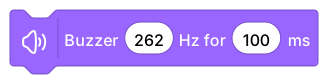
Function Description: Play a tone at a specified frequency and volume.
Non-blocking function, the program will immediately continue execution, add delay manually if necessary
Parameters:
Frequency: Tone frequency (Hz)
time: ms
Buzzer Play Note
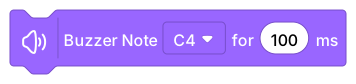
Function Description: Play a predefined musical note.
Non-blocking function, the program will immediately continue execution, add delay manually if necessary
Parameters:
Note: Select note (such as C4, D4, E4, etc.)
time: ms
Buzzer Stop
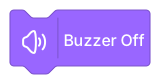
Function Description: Stop buzzer playback.
OLED Clear Screen
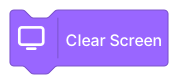
Function Description: Clear all content from the OLED display.
OLED Display Text

Function Description: Display text at a specified position on the OLED screen.
Parameters:
Text: Text content to display
X Coordinate: Horizontal position (pixels) (0-128)
Y Coordinate: Vertical position (pixels) (0-32)
Update: To avoid screen flickering caused by too many screen updates, multiple screen displays can update the screen only on the last block to avoid flickering issues.
OLED Set Text Size
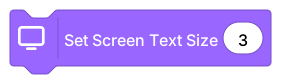
Function Description: Set the text size for OLED display.
Parameters:
Size: 1-3 (larger numbers mean larger text)
OLED Set Text Color
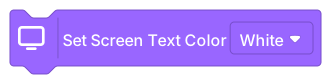
Function Description: Set the text color for OLED display.
Parameters:
Color: White or Black
Serial Communication
USB Serial Output (No Line Break)
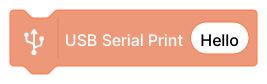
Function Description: Output text through USB serial port without automatic line break.
Parameters:
Text: Content to output
USB Serial Output (With Line Break)

Function Description: Output text through USB serial port with automatic line break.
Parameters:
Text: Content to output
USB Serial Write Byte
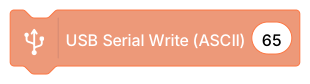
Function Description: Write raw byte data through USB serial port.
Parameters:
Data: Byte value to write
USB Serial Output Three-Axis Data

Function Description: Output three-axis sensor data through USB serial port in a specific format.
Parameters:
X-axis: X-axis value
Y-axis: Y-axis value
Z-axis: Z-axis value
Usage:
Suitable for real-time monitoring of IMU sensor data
Can be parsed by Serial Plotter for visualization
USB Serial Check Data Available

Function Description: Check if there is data available to read in the serial buffer.
Return Value:
Integer representing the number of bytes available to read
USB Serial Read

Function Description: Read one character from the serial port.
Return Value:
Integer (ASCII value), returns -1 if no data available
Sensors
MJ2 Controller Polling
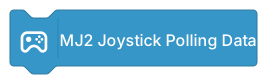
Function Description: Update MJ2(PS2) controller state data. Should be placed in the main loop for regular execution.
MJ2 Adapter Connection:
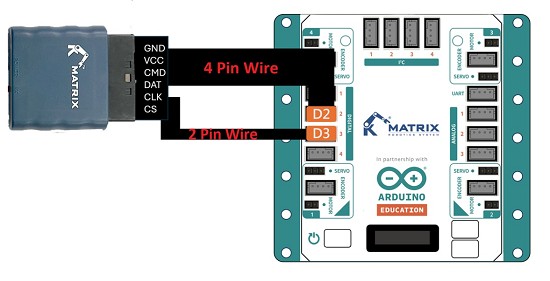
MJ2 Button State

Function Description: Read MJ2(PS2) controller button state.
How to connect to MJ2? Please scroll up to the MJ2 Polling section.
Parameters:
Button: Select the button to read
Return Value:
true: Button is pressedfalse: Button is not pressed
MJ2 Joystick Value

Function Description: Read MJ2(PS2) controller joystick analog value.
How to connect to MJ2? Please scroll up to the MJ2 Polling section.
Parameters:
Joystick: Select left or right joystick X/Y axis
Return Value:
0-255 (center point approximately 128, X axis from left to right 0-255, Y axis from top to bottom 0-255)
IMU Reset
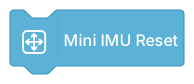
Function Description: Reset the onboard IMU (Inertial Measurement Unit) values.
IMU Acceleration Read

Function Description: Read acceleration sensor value.
Parameters:
Axis: X, Y or Z axis
Return Value:
Floating point number (unit: g)
IMU Gyroscope Read

Function Description: Read gyroscope angular velocity.
Parameters:
Axis: X, Y or Z axis
Return Value:
Floating point number (unit: degrees/second)
IMU Euler Angle Read
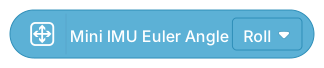
Function Description: Read attitude angles (Roll, Pitch, Yaw).
Parameters:
Angle: Roll, Pitch or Yaw
Return Value:
Floating point number (unit: degrees)
Grayscale Sensor Read

Function Description: Read MATRIX grayscale sensor value.
Parameters:
Pin: Connected analog pin
Return Value:
0-1023 (lower value indicates darker color)
Potentiometer Read
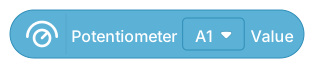
Function Description: Read MATRIX potentiometer (knob) value.
Parameters:
Pin: Connected analog pin
Return Value:
0-1023
Water Level Sensor Read

Function Description: Read MATRIX water level sensor value.
Parameters:
Pin: Connected analog pin
Return Value:
0-1023 (higher value indicates higher water level)
Soil Moisture Sensor Read

Function Description: Read MATRIX soil moisture sensor value.
Parameters:
Pin: Connected analog pin
Return Value:
0-1023 (higher value indicates higher moisture)
Miniature Switch State

Function Description: Read MATRIX miniature switch state.
Parameters:
Pin: Connected digital pin (D1-D4)
Return Value:
true: Switch is triggeredfalse: Switch not triggered
PIR Human Infrared Sensor

Function Description: Read MATRIX PIR human infrared sensor state.
Parameters:
Pin: Connected digital pin (D1-D4)
Return Value:
true: Human movement detectedfalse: No movement detected
DHT Temperature & Humidity Sensor Polling
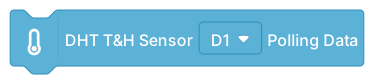
Function Description: Update DHT temperature & humidity sensor readings.
Parameters:
Pin: Connected digital pin (D1-D4)
DHT Temperature & Humidity Read

Function Description: Read temperature or humidity from DHT sensor.
Parameters:
Pin: Connected digital pin (D1-D4)
Type: Temperature or Humidity
Return Value:
Floating point number (Temperature unit: °C, Humidity unit: %)
DS18B20 Temperature Sensor

Function Description: Read DS18B20 temperature sensor value.
Parameters:
Pin: Connected digital pin (D1-D4)
Return Value:
Floating point number (unit: °C)
MATRIX Color Sensor Initialize (V1, V2)
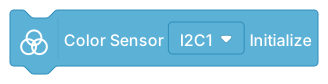
Function Description: Initialize MATRIX color sensor V2 version.
Parameters:
I2C Pin: Select connected I2C pin (I2C0-I2C4)
Note: V1, V2 and V3 hardware are incompatible, please pay attention to the hardware version and program used
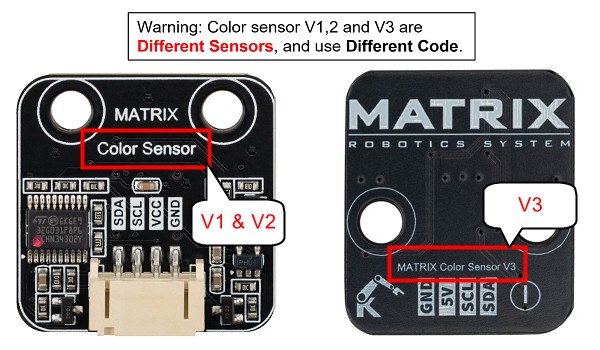
MATRIX Color Sensor Read (V1, V2)

Function Description: Read MATRIX color sensor V2 color recognition result.
Parameters:
I2C Pin: Select connected I2C pin (I2C0-I2C4)
Mode: Color ID (LEGO color standard), RGB, HSV, CMYK
Return Value:
Corresponding value
Color ID Correspondence Table:
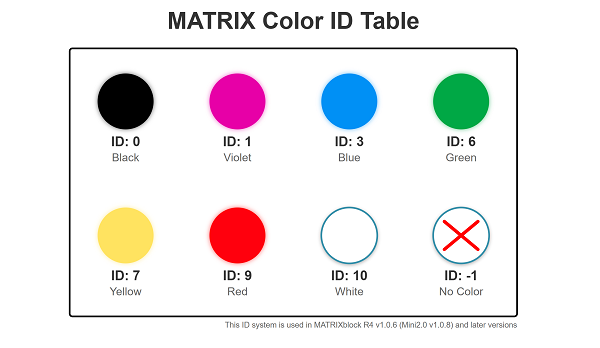
MATRIX Color Sensor Initialize (V3)

Function Description: Initialize MATRIX color sensor V3 version.
Parameters:
I2C Pin: Select connected I2C pin (I2C0-I2C4)
Note: V1, V2 and V3 hardware are incompatible, please pay attention to the hardware version and program used
MATRIX Color Sensor Read (V3)

Function Description: Read MATRIX color sensor V3 RGB or HSV values.
Parameters:
I2C Pin: Select connected I2C pin (I2C0-I2C4)
Mode: Color ID (LEGO color standard), RGBC, HSV
Return Value:
Corresponding value
Color ID Correspondence Table:
MATRIX Laser Distance Sensor Initialize (V1)
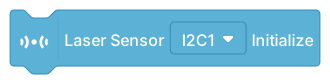
Function Description: Initialize MATRIX laser distance sensor V1 version.
Parameters:
I2C Pin: Select connected I2C pin (I2C0-I2C4)
Note: V1 and V2 hardware are incompatible, please pay attention to the hardware version and program used
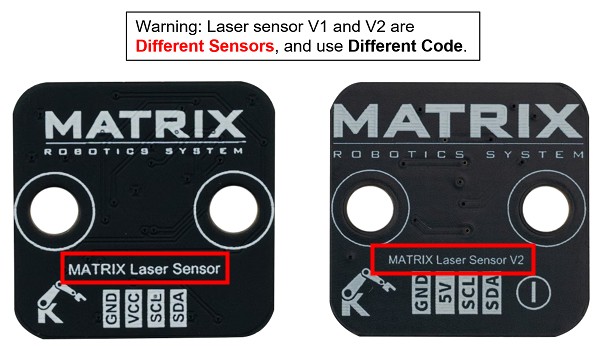
MATRIX Laser Distance Sensor Read (V1)

Function Description: Read MATRIX laser distance sensor V1 distance.
Parameters:
I2C Pin: Select connected I2C pin (I2C0-I2C4)
Return Value:
Integer (unit: millimeters)
MATRIX Laser Distance Sensor Initialize (V2)

Function Description: Initialize MATRIX laser distance sensor V2 version.
Parameters:
I2C Pin: Select connected I2C pin (I2C0-I2C4)
Note: V1 and V2 hardware are incompatible, please pay attention to the hardware version and program used
MATRIX Laser Distance Sensor Read (V2)

Function Description: Read MATRIX laser distance sensor V2 distance.
Parameters:
I2C Pin: Select connected I2C pin (I2C0-I2C4)
Return Value:
Integer (unit: millimeters)
MATRIX Gesture Sensor Initialize
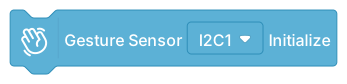
Function Description: Initialize MATRIX gesture sensor.
Parameters:
I2C Pin: Select connected I2C pin (I2C0-I2C4)
MATRIX Gesture Sensor Read

Function Description: Read MATRIX gesture sensor recognized gesture.
Parameters:
I2C Pin: Select connected I2C pin (I2C0-I2C4)
Return Value:
Number: 0: None, 1: Right, 2: Left, 3: Up, 4: Down, 5: Forward, 6: Backward 7: Clockwise, 8: Anti-Clockwise, 9: Wave
MATRIX Gesture Sensor Determine

Function Description: Determine if the gesture sensor detected a specific gesture.
Parameters:
I2C Pin: Select connected I2C pin (I2C0-I2C4)
Gesture: Gesture type to determine
Return Value:
trueorfalse
MVision Vision Sensor Initialize

Function Description: Initialize MVision vision sensor (via UART).
MVision Read Data
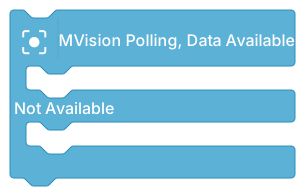
Function Description: Read MVision vision sensor recognition result.
MVision Get Data
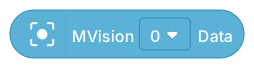
Function Description: Get specific data field from MVision vision sensor.
Parameters:
Data Type: User-defined when programming MVision Camera
Return Value:
Integer
HuskyLens Initialize
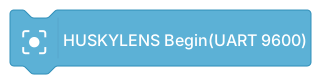
Function Description: Initialize HuskyLens AI vision sensor (via UART, Baud Rate 9600).
Note: Do not directly use the original JST to JST cable to connect HuskyLens Camera, as pin definitions differ and jumper wires are needed!
Note: UART Pin define on MATRIX R4 is (TX, RX, V, G)
HuskyLens Read

Function Description: Read HuskyLens recognition result.
HuskyLens Get Block

Function Description: Get HuskyLens recognized block (object) information.
Parameters:
Index: Block number
Data Type: ID, X, Y, Width, Height
Return Value:
Integer
HuskyLens Get Arrow

Function Description: Get HuskyLens recognized arrow (line) information.
Parameters:
Index: Arrow number
Data Type: Start X, Start Y, End X, End Y
Return Value:
Integer
HuskyLens Detection Determine

Function Description: Determine if HuskyLens detected an object.
Return Value:
trueorfalse
MATRIX Line Tracer Sensor Initialize
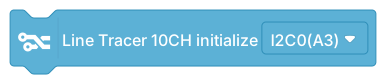
Function Description: Initialize MATRIX 10-channel line tracer sensor.
Parameters:
I2C Pin: Select connected I2C pin (I2C0-I2C4)
MATRIX Line Tracer Sensor Calibration

Function Description: Control line tracer sensor calibration procedure.
Parameters:
I2C Pin: I2C0, Port A3 (current version of line tracer sensor only supports native channel connection)
Action: Start calibration or Stop calibration
Instructions:
Call "Start calibration"
Move sensor over white line and black line
Call "Stop calibration" to complete calibration
MATRIX Line Tracer Sensor Read

Function Description: Read sensor value of specified channel.
Parameters:
I2C Pin: I2C0, Port A3 (current version of line tracer sensor only supports native channel connection)
Sensor Number: 1-10
Return Value:
Integer (0-100, higher value indicates closer to black line)
MATRIX Line Tracer Sensor Get Value

Function Description: Get line tracer sensor error value or line position.
Parameters:
I2C Pin: I2C0, Port A3 (current version of line tracer sensor only supports native channel connection)
Type: Error (ERROR), Line Width, Junction Type, Last Sensor
Return Value:
Floating point number
ERROR: -4.5 to 4.5 (0 indicates center, value range can be adjusted by ratio)
Line Width: 0 to 10
Junction Type: 0 = None, 1 = Left, 2 = Right, 3 = T or Cross, 4 = Unknown/None
Last Sensor: 1 - 10
MATRIX Line Tracer Sensor Get Status

Function Description: Query line tracer sensor status.
Parameters:
I2C Pin: I2C0, Port A3 (current version of line tracer sensor only supports native channel connection)
Type: Whether sensor is still on line
Return Value:
trueorfalse
MATRIX Line Tracer Sensor Set Weights

Function Description: Set weight values for sensors S6-S10 for error calculation.
Parameters:
I2C Pin: I2C0, Port A3 (current version of line tracer sensor only supports native channel connection)
S6-S10: Weight for each channel (default: 0.5, 1.5, 2.5, 3.5, 4.5)
Description:
Weight values affect error calculation sensitivity
Usually set symmetrically (S1=-S10, S2=-S9...)
MATRIX Line Tracer Sensor Set Threshold

Function Description: Set black line detection threshold for the sensor.
Parameters:
I2C Pin: I2C0, Port A3 (current version of line tracer sensor only supports native channel connection)
Threshold: 0-100 (default: 30)
Description:
Higher value makes black line detection standard more lenient
Recommend calibration before adjusting this value
Third-Party Modules
HiTechnic Color Sensor Initialize

Function Description: Initialize HiTechnic color sensor.
Parameters:
I2C Pin: Select connected I2C pin (I2C0-I2C4)
HiTechnic Color Sensor Read

Function Description: Read HiTechnic color sensor values.
Parameters:
I2C Pin: Select connected I2C pin (I2C0-I2C4)
Type: Color ID (HiTechnic ID), R, G, B, HSV
Return Value:
Integer
DHT11 Temperature & Humidity Read

Function Description: Read DHT11 temperature & humidity sensor value.
Parameters:
Pin: Connected digital pin (D1-D4)
Type: Temperature or Humidity
Return Value:
Integer (Temperature unit: °C, Humidity unit: %)
DS18B20 Temperature Read

Function Description: Read DS18B20 waterproof temperature sensor.
Parameters:
Pin: Connected digital pin (D1-D4)
Return Value:
Floating point number (unit: °C)
Grove Ultrasonic Sensor
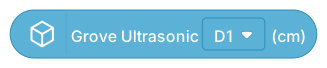
Function Description: Read Grove ultrasonic distance sensor distance.
Parameters:
Pin: Connected digital pin (D1-D4)
Return Value:
Floating point number (unit: centimeters)
Ultrasonic Sensor

Function Description: Read standard HC-SR04 ultrasonic sensor distance.
Parameters:
Trig Pin: Trigger pin
Echo Pin: Echo pin
Return Value:
Floating point number (unit: centimeters)
Timer Reset
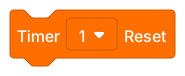
Function Description: Reset the timer, start counting from 0.
Timer Read
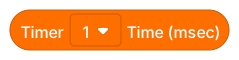
Function Description: Read elapsed time on the timer.
Return Value:
Integer (unit: milliseconds)
IoT Internet of Things
WiFi Connection

Function Description: Connect to WiFi network (2.4GHz only).
Parameters:
SSID: WiFi network name
Password: WiFi password
Description:
Arduino Uno R4 WiFi chip only supports 2.4GHz WiFi
Connection process takes several seconds
WiFi Status

Function Description: Check WiFi connection status.
Return Value:
true: Connectedfalse: Not connected
WiFi Local IP

Function Description: Get device's local IP address.
Return Value:
String (e.g., "192.168.1.100")
WiFi Configure Static IP

Function Description: Configure device to use fixed IP address.
Parameters:
IP1-IP4: Four values of IP address
Example:
Set to 192.168.4.1
WiFi Create Hotspot

Function Description: Set device as WiFi hotspot (AP mode).
Parameters:
SSID: Hotspot name
Password: Hotspot password (at least 8 characters)
BLE Initialize
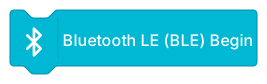
Function Description: Initialize Bluetooth Low Energy (BLE) functionality.
BLE Set Name
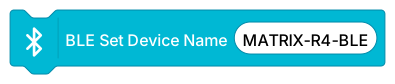
Function Description: Set BLE device broadcast name.
Parameters:
Name: Device name to display
BLE Enable Nordic UART
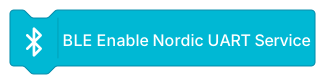
Function Description: Enable Nordic UART Service for BLE serial communication, closer to previous HC-05 usage.
BLE Update
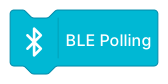
Function Description: Update BLE connection status and data. Should be placed in main loop for regular execution.
BLE Connection Status

Function Description: Check if BLE has device connected.
Return Value:
true: Connectedfalse: Not connected
BLE UART Send
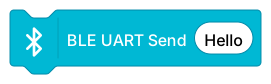
Function Description: Send message via BLE UART.
Parameters:
Message: Text content to send
BLE When Data Received

Function Description: Execute internal code when BLE receives data. This is a HAT block.
Note: Do not place multiple instances of this block in the program canvas, as this will cause abnormal functionality.
Usage:
xxxxxxxxxxWhen BLE data receivedDisplay BLE received data
BLE Received Data
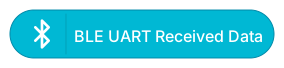
Function Description: Get BLE received data content.
Return Value:
String
MQTT Connection

Function Description: Connect to MQTT Broker.
Parameters:
Broker: MQTT server address
Port: Port (default: 1883)
Client ID: Client identifier (leave empty for auto-generation)
Username: Login account (optional)
Password: Login password (optional)
Common Free Test Brokers:
broker.hivemq.com (free public)
test.mosquitto.org (for testing)
Common Free Test Client Website:
MQTT Loop
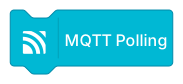
Function Description: Maintain MQTT connection and process messages. Should be placed in the main loop for regular execution.
MQTT Subscribe to Topic

Function Description: Subscribe to an MQTT topic to receive messages.
Parameters:
Topic: Topic path to subscribe to
Example:
"matrix/r4/test"
"robot/sensors/#" (# indicates wildcard)
MQTT Publish Message

Function Description: Publish a message to an MQTT topic.
Parameters:
Topic: Target topic path
Message: Content to send
MQTT When Message Received

Function Description: Execute internal code when MQTT receives a message from a subscribed topic. This is a HAT block.
Note: Do not place multiple instances of this block in the program canvas, as this will cause abnormal functionality.
Usage:
xxxxxxxxxxWhen MQTT message receivedIf MQTT received topic = "robot/cmd"Display MQTT received message
MQTT Received Topic

Function Description: Get the source topic of the MQTT message.
Return Value:
String
MQTT Received Message

Function Description: Get the content of the MQTT message.
Return Value:
String
MQTT Connection Status

Function Description: Check if MQTT is connected.
Return Value:
true: Connectedfalse: Not connected
Control Flow
Wait
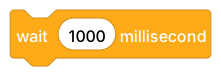
Function Description: Pause program execution for a specified time.
Parameters:
Time: Milliseconds to wait (1000ms = 1 second)
If...Then

Function Description: Conditional statement, executes internal code when condition is true.
Usage:
xxxxxxxxxxIf temperature > 30Turn on fan
If...Then...Else

Function Description: Conditional statement, executes different code based on condition.
Usage:
xxxxxxxxxxIf button is pressedLED redElseLED green
Repeat
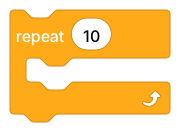
Function Description: Repeat internal code a specified number of times.
Parameters:
Times: Number of repetitions
Usage:
xxxxxxxxxxRepeat 10 timesFlash LED
Forever

Function Description: Repeat internal code indefinitely until program stops.
Usage:
xxxxxxxxxxForeverRead sensorUpdate display
Wait Until
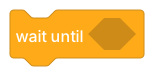
Function Description: Pause program execution until condition becomes true.
Usage:
xxxxxxxxxxWait until button is pressedExecute task
Repeat Until
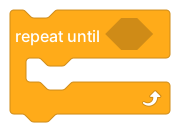
Function Description: Repeat internal code until condition becomes true.
Usage:
xxxxxxxxxxRepeat until distance < 10Move forwardBrake
Get Execution Time

Function Description: Get milliseconds elapsed since program started execution.
Return Value:
Integer (unit: milliseconds)
Uses:
Timing functions
Non-blocking delays
Event interval control
Operators
Map Range

Function Description: Map a value from one range to another range.
Parameters:
Value: Value to map
Source Min: Original range lower limit
Source Max: Original range upper limit
Target Min: Target range lower limit
Target Max: Target range upper limit
Example:
Map sensor value 0-1023 to percentage 0-100
Constrain Range

Function Description: Constrain a value within a specified range.
Due to the underlying design of the constrain() function, please avoid using data other than variables and constants within parentheses, as this may lead to incorrect results.
Parameters:
Value: Value to constrain
Min: Lower limit
Max: Upper limit
Example:
Constrain motor speed between -100 and 100
Addition
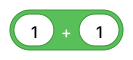
Function Description: Calculate the sum of two numbers.
Subtraction
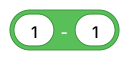
Function Description: Calculate the difference of two numbers.
Multiplication
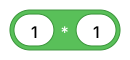
Function Description: Calculate the product of two numbers.
Division
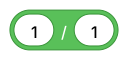
Function Description: Calculate the quotient of two numbers.
Random Number

Function Description: Generate a random integer within a specified range.
Parameters:
Start: Range lower limit
End: Range upper limit (inclusive)
Set Random Seed

Function Description: Set the seed value for the random number generator.
Parameters:
Seed: Integer value
Uses:
Generate reproducible random sequences
Use 0 to generate truly random sequences
Less Than
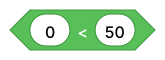
Function Description: Determine if the first value is less than the second value.
Return Value:
trueorfalse
Equals

Function Description: Determine if two values are equal. (Can also be used for string comparison)
Return Value:
trueorfalse
Greater Than

Function Description: Determine if the first value is greater than the second value.
Return Value:
trueorfalse
Boolean Constant

Function Description: Provide true or false boolean constants.
AND

Function Description: Logical AND operation, returns true when both conditions are true.
Return Value:
trueorfalse
OR

Function Description: Logical OR operation, returns true when at least one condition is true.
Return Value:
trueorfalse
NOT

Function Description: Logical NOT operation, inverts boolean value.
Return Value:
trueorfalse
String Join

Function Description: Concatenate two strings.
Example:
"Hello" + "World" = "HelloWorld"
Three String Join

Function Description: Concatenate three strings.
Get Character
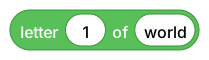
Function Description: Get the character at a specified position in a string.
Parameters:
Position: Character position (starting from 1)
String: Source string
Return Value:
Single character
String Length
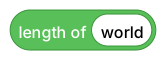
Function Description: Get the length of a string.
Return Value:
Integer (number of characters)
Convert to String
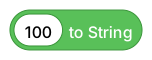
Function Description: Convert a number to a string.
Convert to Float
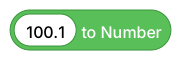
Function Description: Convert a string to a floating-point number.
Modulo
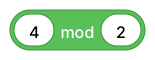
Function Description: Calculate the remainder of division.
Example:
5 mod 2 = 1
Round
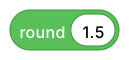
Function Description: Round a number to the nearest integer.
Math Operation
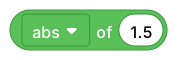
Function Description: Perform advanced mathematical operations.
Options:
abs: Absolute value
floor: Round down
ceiling: Round up
sqrt: Square root
sin, cos, tan: Trigonometric functions (Returns values in radians. Result is between -1 and 1)
asin, acos, atan: Inverse trigonometric functions (Returns values in radians. Result is between -1 and 1)
ln: Natural logarithm
log: Common logarithm
e^: Exponential function
10^: Power of 10
Variables
The variables category provides functionality for creating and managing variables.
Create Variable
Click the "Create Variable" button to create a new variable.
Set Variable
Store a value in a variable.
Read Variable
Get the value stored in a variable.
Change Variable
Increase the variable's value by a specified amount.
Custom Blocks
The custom blocks category allows you to create reusable program blocks.
Create Custom Block
Click the "Create Block" button
Enter block name
Choose whether to add parameters
Define the block's program content
Benefits
Code reusability
Improved code readability
Simplified complex logic
Easy maintenance and modification
Use Custom Block
After creation, custom blocks will appear in this category and can be dragged and used like any other block.
Custom Block Variable - Number
A local numeric variable for use only within the custom block
Custom Block Variable - String
A local string variable for use only within the custom block
Custom Block Variable - Boolean
A local boolean variable for use only within the custom block
Version Information:
Document Version: 1.0
Last Updated: December 2025
Compatible Hardware: MATRIX Mini R4 (Arduino Uno R4 WiFi)